Your bid is due Friday. Takeoff is half done on paper, the lumber quote expired Tuesday, and the framing sub wants a number today. Residential construction estimating software fixes that kind of week, but only if it matches how you actually bid.
The right tool depends on whether you start from plans, from an assembly library, or from your own cost history. So pick on that, not on the feature list.
What Residential Construction Estimating Software Actually Does
In short, think of it as three jobs bundled together. It measures quantities from plans, prices them from a cost database, and rolls them into a proposal.
Some tools only do the first job. Others, however, skip digital takeoff and give you a spreadsheet with a nicer wrapper. So know which one you are buying.
A typical 2,400 sq ft spec house has thousands of line items. Counting every stud, joist hanger and box of 16d nails by hand invites a missed item, and a missed item comes out of your margin. By contrast, good software counts each one the same way every time.
It will not fix a bad scope. If the plans are vague on window schedules or finishes, the software multiplies that vagueness faster than a spreadsheet would.
Takeoff Methods: Digital Plans or Assemblies
Software handles quantities in two ways, and the split decides your workflow.

Option A: Plan-Based Digital Takeoff
You upload a PDF, set the scale, and click through walls, slabs and roof planes. The program measures linear feet, square feet and counts.
This suits custom homes where every set of plans is different. You catch the odd stuff, like a vaulted ceiling over the great room or a retaining wall the architect tucked into sheet C-2. The cost is time. A full takeoff on a custom home can run a full day or more.
Option B: Assembly-Based Estimating
You build a wall assembly once: studs at 16 inches on center, plates, sheathing, house wrap, insulation. Then you apply it to total wall length and height.
This suits production and spec builders working from repeat plans. A wall type priced once gets reused across twenty houses. The risk is stale assemblies. If you changed from 2×4 to 2×6 exterior walls two years ago and forgot to update the template, every bid is wrong.
Many contractors run both. Assemblies for the base house, plan-based takeoff for the custom upgrades.
Residential Construction Estimating Software Compared
Prices change often and many vendors quote by seat or by revenue. Confirm every figure on the vendor’s page before you commit.
| Tool | Best for | Takeoff style | Pricing model | Weak spot |
|---|---|---|---|---|
| Buildxact | Small residential builders and remodelers | Plan-based plus assemblies | Tiered monthly subscription | Thin on large multifamily |
| Houzz Pro | Remodelers who also need client portal and leads | Basic takeoff | Monthly subscription | Estimating depth is shallow |
| STACK | Subs and GCs who want fast plan measuring | Plan-based takeoff | Subscription, tiered | Less built-in cost data |
| Sage Estimating | Mid-size builders with cost databases | Assembly-based | Quote-based | Heavy setup, steeper learning curve |
| Procore | Larger GCs running many projects | Not a takeoff tool | Annual construction volume-based, custom quote | Overkill for a small crew |
Procore lists custom pricing based on annual construction volume, per its pricing page, so you cannot price it without a sales call. That alone rules it out for many one-truck outfits.
For a longer look at the category, see our guide to estimating software for construction.
How to Pick Residential Construction Estimating Software
First, work through these steps in order. If you skip one, you will pay for it in month three.
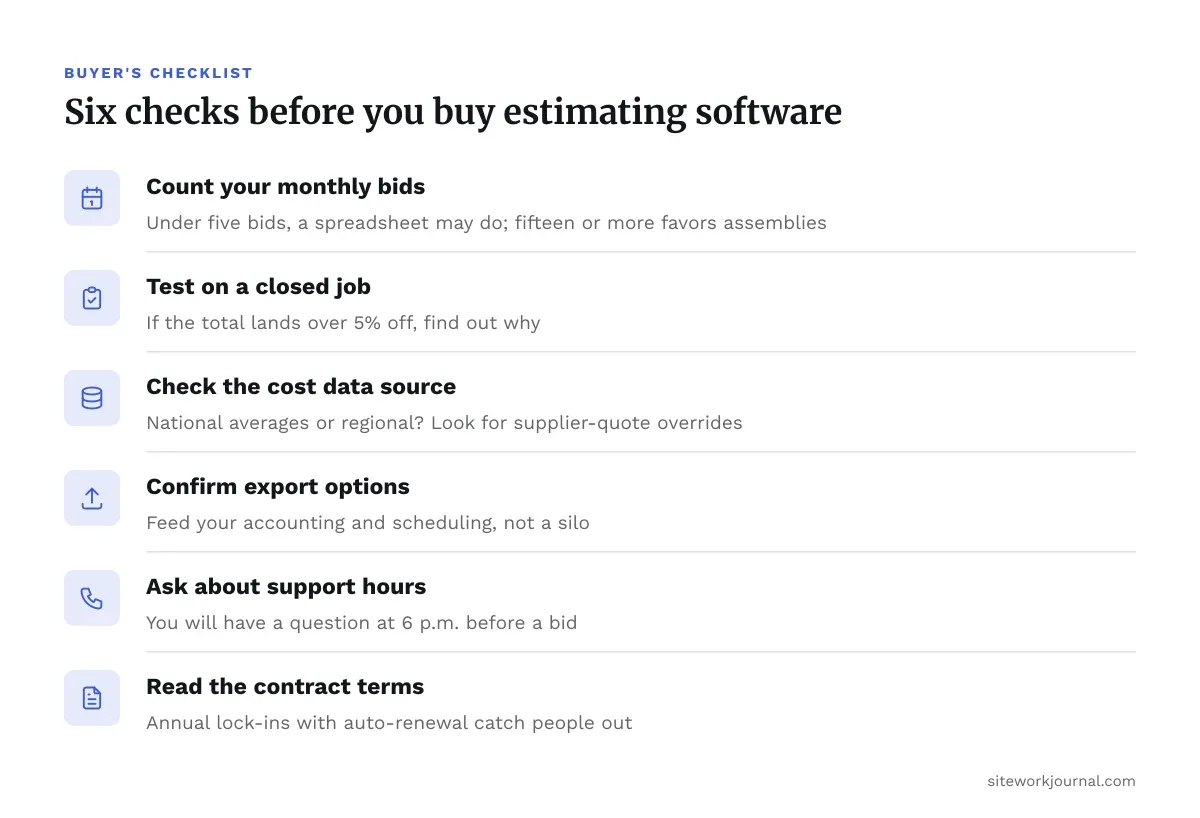
- Count your bids per month. Under five, a plan-measuring tool plus your own spreadsheet may be enough. Fifteen or more, assemblies start paying back.
- Test it on a closed job. Run a house you already built through the software. If the total lands more than 5% off your actual costs, find out why before trusting it.
- Check the cost data source. Is it national averages or regional? Framing labor in Phoenix is not framing labor in Boston. Look for a way to override with your own supplier quotes.
- Confirm export options. You want the estimate to feed your accounting and scheduling, not sit in its own silo.
- Ask about support hours. You will have a question at 6 p.m. the night before a bid.
- Read the contract terms. Annual lock-ins with auto-renewal catch people out.
Above all, take a free trial seriously. Do not click around the demo project. Instead, load a real set of plans.
Mistakes That Cost You Money
The software is rarely the problem. Instead, the inputs are.
Default waste factors. Most programs add 5% to 10% waste on lumber and sheet goods by default. On a roof with lots of hips and valleys, however, real waste runs higher. On a simple box, by contrast, it runs lower. Set it by trade, not by the default.
Forgotten overhead and markup. Your software gives you direct cost. Overhead, profit and contingency, meanwhile, are on you. Builders who apply a flat markup without loading in insurance and office costs often discover they are busy and broke.
Ignoring retainage. Owners and lenders commonly hold 5% to 10% until substantial completion, depending on contract terms and state statute, per FAR 52.232-5 for federal work. On a $400,000 build, a 10% hold is $40,000 you do not have for months. Your estimate should show that cash-flow gap even if the software does not.
Stale unit costs. A cost database that was accurate in January may be off by autumn. So refresh lumber and concrete pricing before every bid, not once a quarter.
Treating output as final. If the estimate touches structural members, bring in a licensed engineer. After all, software sizes quantities, not beams.
Where AI Takeoff Fits
Several vendors now advertise automatic takeoff that reads plans and counts items without you clicking. For example, it saves time on clean, well-drawn sets.
Still, it struggles with hand-marked revisions, low-resolution scans and unusual details. Treat it as a first pass, then verify the numbers yourself. We covered the tradeoffs in AI construction estimating, including where it saves money and where it does not.
Ask any vendor for a live demo on your own plans. Otherwise, a canned demo on a tidy sample house proves nothing.
Choosing Residential Construction Estimating Software That Fits Your Jobs
The best residential construction estimating software is the one your crew will open on every bid. In other words, a cheaper tool you use beats an expensive suite that sits unopened.
Start with your bid volume and your plan type. Test on a finished job, check the cost data against your supplier quotes, and keep your own overhead and retainage math in the loop. If a contract or lien question comes up, talk to a construction attorney rather than guessing.
Once you have narrowed the field, go back to the broader estimating section for template and takeoff guidance.
Frequently asked questions
What is the best residential construction estimating software for a small builder?
Buildxact and Houzz Pro are common picks for small residential and remodeling shops. Buildxact leans toward estimating depth, while Houzz Pro bundles client management. Run a closed job through each trial before you decide.
Can I just use Excel instead of estimating software?
Yes, if you bid a handful of jobs a month and keep your cost data clean. Spreadsheets break down when you need repeatable assemblies, plan-linked quantities and fast revisions. The risk is a broken formula nobody notices until a job loses money.
How accurate is software takeoff compared to manual takeoff?
Accuracy depends on the plans and your setup, not the tool alone. A clean scale and consistent assemblies often beat hand counting, but a wrong scale ruins everything. Always spot-check a few quantities by hand.
Does estimating software include current material prices?
Some tools ship with regional cost databases, and others expect you to import your own supplier quotes. Either way, verify lumber and concrete prices before each bid. Most databases lag the market.
Do I still need an engineer if the software sizes materials?
Yes, for anything structural. Estimating software counts and prices material. It does not provide engineering sign-off, so bring in a licensed engineer or check with the AHJ on code questions.